
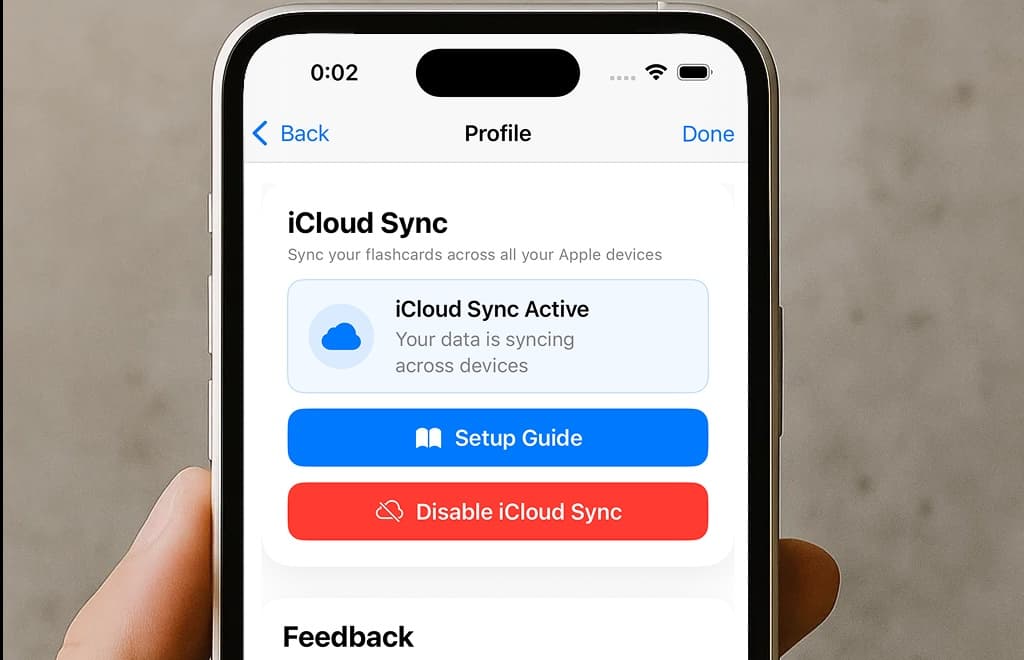
🔄 iCloud Sync: Your Flashcards, Everywhere (Premium Feature)
The star of Version 1.9 is undoubtedly iCloud Sync, a premium feature that has been highly requested by our community. Now, your flashcards and collections can seamlessly sync across all your Apple devices, ensuring your learning never stops, regardless of which device you're using.
Seamless Multi-Device Learning
With iCloud Sync enabled, any changes you make on one device will automatically appear on all your other devices. Whether you're studying on your iPhone during your commute, creating new flashcards on your iPad at home, or reviewing on your Mac, everything stays perfectly in sync.
How to Set Up iCloud Sync
Setting up iCloud Sync is straightforward and takes just a few minutes:
- (Sign In & Restore) Make sure all devices are signed in using the same Apple ID and that the MindCards App is displaying the premium status. If premium status is not showing, go to the premium page and click on "Restore Purchases"
- (Enable iCloud Sync) Enable iCloud Sync on all devices and make sure you are connected to the internet
- (Wait for Sync) After enabling iCloud it can take a minute before all data is synced. As each device will have its own data, you would need to merge the accounts before syncing is automated. To do so, close the profile page (e.g., by going to the home page) and re-open the profile page after a minute or so.
- (Merge Accounts) The iCloud section should now show a button saying "Manage 2 Accounts". Click this button and select the account that you want to keep first! After selecting the account, choose "merge accounts" to simply bring over any collections that were created in the other account(s) to your main account.
- (All Set!) Going forward, any change that is made on your device will also be reflected on your other device(s). You may need to repeat this process for any additional device that is onboarded.
Once set up, iCloud Sync works silently in the background, keeping all your devices perfectly synchronized. No more worrying about which device has your latest flashcards, everything is always up to date!
Note: iCloud Sync is available to premium subscribers starting from MindCards v1.9.0. If you haven't upgraded yet, now is the perfect time to unlock this powerful feature along with all the other premium benefits!
💬 Share Feedback Directly from Your Profile
We believe that your voice matters, and we want to make it easier than ever to share your thoughts, suggestions, and feedback with us. That's why we've added a new feedback feature directly accessible from your profile page.
No more having to leave the app to send us an email or navigate through multiple menus. Simply open your profile page and tap the feedback button, it's that easy! Whether you have a feature request, found a bug, or just want to share your learning success story, we're listening.
Your feedback helps us understand what you need most and guides the future direction of MindCards. We read every single message and use your input to make MindCards even better with each update.
✨ Improved AI Card Generation Workflow
We've made significant improvements to how you review cards after generating them with AI. Previously, newly generated cards appeared at the bottom of the screen, which could make them easy to miss or feel hidden. We've changed that!
Now, when you generate cards using AI, the cards ready for review are displayed in a separate, dedicated page. This creates a clear, focused experience that immediately shows you that your cards are ready and waiting for review. No more scrolling to find your newly created flashcards, they're front and center where they belong!
This change makes the workflow more intuitive and ensures you never miss reviewing your newly generated cards. The separate page provides a clean, distraction-free environment where you can review and edit your cards before saving them to your collection.
🎯 What This Means for Your Learning
- Learn anywhere, anytime: With iCloud Sync, your flashcards follow you across all your devices, making it easy to study whenever inspiration strikes
- Your voice matters: The new feedback feature makes it easier to share your ideas and help shape the future of MindCards
- Smoother workflows: The improved AI card generation makes it clearer and easier to review your newly created flashcards
📱 Update Now and Experience the Difference
MindCards 1.9 is available now in the App Store. Update your app today to start enjoying seamless syncing across your devices, easier feedback sharing, and an improved AI card generation experience!

🔮 What's Next?
We're already hard at work on exciting new features for future updates. Your feedback continues to guide our roadmap, and we're committed to making MindCards the best flashcard learning app available.
If you're a premium user, make sure to enable iCloud Sync and experience the convenience of having your flashcards available on all your devices. And if you have any thoughts about this update or ideas for future features, don't hesitate to use the new feedback button in your profile page!
Happy studying with MindCards version 1.9!